
AdalFlow: A PyTorch-Like Framework to Auto-Optimizing Prompt for your LLM agent

Say goodbye to manual prompt engineering. AdalFlow is the all-in-one, auto-differentiative solution for optimizing prompts, whether you’re using zero-shot or few-shot learning. Backed by our state-of-the-art research (LLM-AutoDiff and Learn-to-Reason), our framework achieves the highest accuracy among all automatic prompt optimization libraries.
The rise of large language models has completely changed the way we build applications—whether it’s chatbots, RAG systems, or fully autonomous agents. But as an AI engineer, trying to bring these models into production often feels like stitching together a bunch of experiments, rather than building a stable and reliable system.
We introduce AdalFlow: a PyTorch-like library designed to bring structure, clarity, and optimization to the world of LLM application development. Built as a community-driven project, AdalFlow is uniting AI research and production engineering into a single ecosystem.
Why We Built AdalFlow
Modern AI development faces a paradox. On one hand, researchers push the boundaries of model capabilities with new techniques in prompting, evaluation, and optimization. On the other hand, production teams need reproducibility, scalability, and a way to iterate safely on real-world data.
Most libraries excel at one side of the equation but leave the other underserved. AdalFlow was born to bridge this gap. With 100% control and clarity of source code, it empowers researchers to experiment freely while giving product engineers the tools to build and ship with confidence.
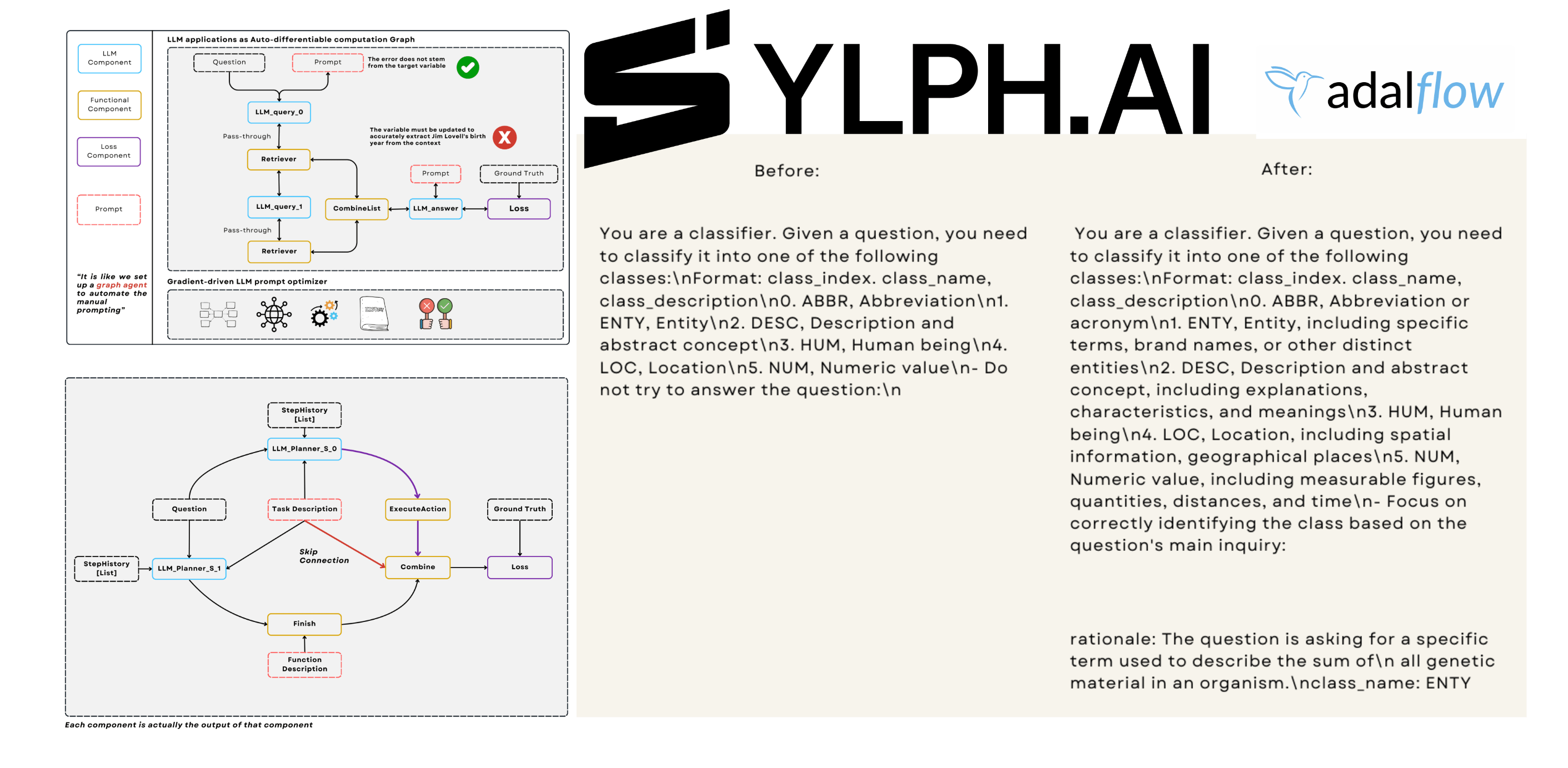
Why AdalFlow Matters
By treating prompts as first-class citizens and introducing LLM-AutoDiff, AdalFlow provides what’s been missing in the LLM ecosystem:
For researchers: A familiar PyTorch-like environment to prototype new prompting and training methods.
For engineers: Production-ready workflows that are debuggable, reproducible, and optimizable.
For teams: A shared framework that unites research and production into one healthy ecosystem.
Core Philosophy: Prompt Is the New Programming Language
If PyTorch turned tensors into the lingua franca of deep learning, AdalFlow treats prompts as the new programming primitives.
Every LLM application boils down to structured prompts and their transformations. AdalFlow embraces this reality by making prompt engineering explicit and optimizable. Behind the scenes, it uses the Jinja2 templating engine to let developers define composable prompt structures, ensuring that LLM apps are both modular and debuggable.
Components: The Building Blocks of LLM Workflows
At the heart of AdalFlow lies the Component abstraction. Just as nn.Module became the foundation for PyTorch models, Components unify every stage of an LLM pipeline.
👉 AdalFlow Core Concepts Colab
Component: The base class for all workflows. Handles both training (forward) and inference (call) modes, with bicall bridging the two.
GradComponent: Components capable of backpropagation (e.g., Generators, Retrievers).
DataComponent: Lightweight components for formatting and parsing data (e.g., DataClassParser).
LossComponent: Wraps evaluation metrics and enables gradient-like feedback for text optimization.
Example 1: Q&A with Object Counting (Component + DataComponent)
👉 Question Answering - Build and Optimize LM Workflows
👉 Question Answering - Build and Optimize LM Workflows Colab
template = r”“”<START_OF_SYSTEM_PROMPT>

{{system_prompt}}

<END_OF_SYSTEM_PROMPT>

<START_OF_USER>

{{input_str}}

<END_OF_USER>”“”

@adal.func_to_data_component

def parse_integer_answer(answer: str):

    numbers = re.findall(r”\d+”, answer)

    return int(numbers[-1])
What’s happening here?
parse_integer_answer is wrapped with @adal.func_to_data_component.
This turns a plain Python function into a
DataComponent, which handles structured output parsing.In this case, it ensures the model’s answer ends with a numerical value.
Next, we define a full pipeline:
class ObjectCountTaskPipeline(adal.Component):
    def __init__(self, model_client: adal.ModelClient, model_kwargs: Dict):
        super().__init__()
        system_prompt = adal.Parameter(
            data=”You will answer a reasoning question. Think step by step. The last line should be ‘Answer: $VALUE’.”,
            role_desc=”Task instruction for the model”,
            requires_opt=True,
            param_type=ParameterType.PROMPT,
        )
        self.llm_counter = adal.Generator(
            model_client=model_client,
            model_kwargs=model_kwargs,
            template=template,
            prompt_kwargs={”system_prompt”: system_prompt},
            output_processors=parse_integer_answer,
        )

    def bicall(self, question: str, id: str = None):
        return self.llm_counter(
            prompt_kwargs={”input_str”: question}, id=id
        )
ObjectCountTaskPipeline subclasses Component. Inside it, we define:
A Parameter of type
PROMPT, which AdalFlow can later auto-optimize.A Generator (a GradComponent) that executes the prompt, then passes the raw LLM output through our
parse_integer_answerDataComponent.
The workflow is:
Prompt → LLM Generation → Structured Output Parsing → Final Numerical Answer.
Example 2: Classification with Structured Output (Component + DataClass)
👉 Classification Optimization - Build and Optimize LM Workflows
@dataclass
class TRECExtendedData(adal.DataClass):
    question: str = field(metadata={”desc”: “The question to be classified”})
    rationale: Optional[str] = field(
        metadata={”desc”: “Step-by-step reasoning”}, default=None
    )
    class_name: Optional[Literal[”ABBR”, “ENTY”, “DESC”, “HUM”, “LOC”, “NUM”]] = field(
        metadata={”desc”: “The class name”}, default=None
    )

    __input_fields__ = [”question”]
    __output_fields__ = [”rationale”, “class_name”]
Classification tasks are a perfect showcase of AdalFlow’s DataClass feature.
TRECExtendedData extends DataClass, which (like Pydantic) gives us schema enforcement.
Input: a question.
Output: a rationale (reasoning trace) and a class_name (final label).
Now let’s plug it into a pipeline:
class TRECClassifierStructuredOutput(adal.Component):
    def __init__(self, model_client: adal.ModelClient, model_kwargs: Dict):
        super().__init__()

        # Task description prompt
        task_desc_str = adal.Prompt(
            template=task_desc_template,
            prompt_kwargs={”classes”: [{”label”: l, “desc”: d}
                                       for l, d in zip(_COARSE_LABELS, _COARSE_LABELS_DESC)]}
        )()

        parser = adal.DataClassParser(
            data_class=TRECExtendedData,
            return_data_class=True,
            format_type=”yaml”
        )

        prompt_kwargs = {
            “system_prompt”: adal.Parameter(
                data=task_desc_str,
                role_desc=”Task description”,
                requires_opt=True,
                param_type=adal.ParameterType.PROMPT,
            ),
            “output_format_str”: parser.get_output_format_str(),
        }

        self.llm = adal.Generator(
            model_client=model_client,
            model_kwargs=model_kwargs,
            prompt_kwargs=prompt_kwargs,
            template=template,
            output_processors=parser,
        )

    def bicall(self, question: str, id: Optional[str] = None):
        return self.llm(prompt_kwargs={”input_str”: question}, id=id)
The Prompt defines the system instruction with class definitions.
DataClassParser enforces structured YAML output that matches TRECExtendedData.
Generator (a GradComponent) runs the LLM with prompt + parser.
Output is guaranteed to follow schema: rationale + class name. This ensures the model never drifts into free-form answers — it always returns structured classification results.
Example 3: Training With Loss Component
Finally, how do we train or optimize these components? That’s where LossComponent comes in:
eval_fn = AnswerMatchAcc(type=”exact_match”).compute_single_item

loss_fn = adal.EvalFnToTextLoss(
    eval_fn=eval_fn,
    eval_fn_desc=”exact_match: 1 if str(y) == str(y_gt) else 0”
)
AnswerMatchAcc is the evaluation metric.
EvalFnToTextLoss wraps it as a LossComponent, enabling LLM-AutoDiff to optimize prompts automatically during training.
By attaching this to your pipeline, you get a full training loop:
Forward pass → Eval metric → Backward engine → Prompt optimization.
Agents: Reasoning Meets Action
AdalFlow embraces the ReAct paradigm — combining reasoning (plan) with acting (tool use) — to build autonomous, auditable AI systems. An agent reasons about the task, selects tools, executes them, observes results, and iterates until it can deliver a final answer.
👉 AdalFlow Agents and Runner Colab
Architecture at a Glance
Agent (planner + tool manager)
Handles planning and decision-making via a Generator-based planner, and knows what tools are available and how to call them.
Runner (executor + conversation loop)
Orchestrates multi-step execution, tool calling, observation handling, timeouts, and final answer synthesis.
This separation lets you swap or customize planning vs. execution independently.
Execution Flow (ReAct Loop Recap)
Planning – The Agent (Generator planner) analyzes input and proposes the next action.
Tool Selection – Chooses a tool from the registered set.
Tool Execution – The Runner invokes the tool with arguments.
Observation – The result is fed back to the planner.
Iteration – Repeat 1–4 up to max_steps or until confident.
Final Answer – The planner synthesizes the answer (optionally into a structured type).
Minimal, End-to-End Example
1) Define a Tool (callable or FunctionTool)
# Tool: a plain Python callable works, or wrap with FunctionTool for extras.
def calculator(expression: str) -> str:

    “”“Evaluate a mathematical expression.”“”

    try:

        result = eval(expression)

        return f”Result: {result}”

    except Exception as e:

        return f”Error: {e}”
2) Build the Agent (Planner + Tools)
from adalflow import Agent, Runner

from adalflow.components.model_client.openai_client import OpenAIClient

agent = Agent(

    name=”CalculatorAgent”,  # Agent identifier

    tools=[calculator],  # List of tools (callables or FunctionTool)

    # LLM client used by the planner (Generator-based)

    model_client=OpenAIClient(),

    model_kwargs={”model”: “gpt-4o”, “temperature”: 0.3},

    max_steps=6,  # Upper bound for ReAct loops

)
What this maps to:
Planner: An internal Generator that decides the next step (think: “reasoning trace”).
ToolManager: The agent’s registry of permitted tools.
max_steps: Safety rail to prevent runaway loops.
Model Configuration (Swap Backends Easily)
# OpenAI
from adalflow.components.model_client.openai_client import OpenAIClient
agent = Agent(model_client=OpenAIClient(), model_kwargs={”model”: “gpt-4o”})

# Anthropic
from adalflow.components.model_client.anthropic_client import AnthropicAPIClient
agent = Agent(model_client=AnthropicAPIClient(), model_kwargs={”model”: “claude-3-sonnet-20240229”})
3) Execute with the Runner (Multi-step Orchestration)
# Manages turns, tool calls, observations, and finalization
runner = Runner(agent=agent)

result = runner.call(
    prompt_kwargs={”input_str”: “Invoke the calculator tool and calculate 15 * 7 + 23”}
)

print(result.answer)
# -> “The result of 15 * 7 + 23 is 128.”
RunnerResult schema (returned by Runner.call)
# result has:
# - result.step_history: [StepOutput(...)]  # Each step’s action + observation
# - result.answer: str | structured type     # Final synthesized answer
# - result.error: None | Exception info      # Error if something failed
# - result.ctx: dict | None                  # Optional execution metadata
This is the full ReAct loop in action:
Plan → Select Tool → Execute → Observe → Iterate → Answer.
Agent Summary:
Agent = Reasoning + Tool selection (Generator-based planner + ToolManager)
Runner = Controlled execution loop (steps, tools, observations, final answer)
Tools = Safe, permissioned extensions to the agent’s capabilities
Production = Streaming, human approvals, tracing, structured outputs
We hope this hands-on example enables a fast start. In the coming articles, we will publish additional tutorials and updates on the latest advances in AI agents. If this was helpful, please subscribe to stay informed about future releases.
For more information, the Documentation is available.
For more open-source code, follow the Github and give a ⭐️. We’d love your feedback!
Beginner friendly!